What Deep Focus actually does
A feature list is easy to write and hard to trust. This one says how each thing works and where it stops, so you can tell before installing whether it does what you need.
Android
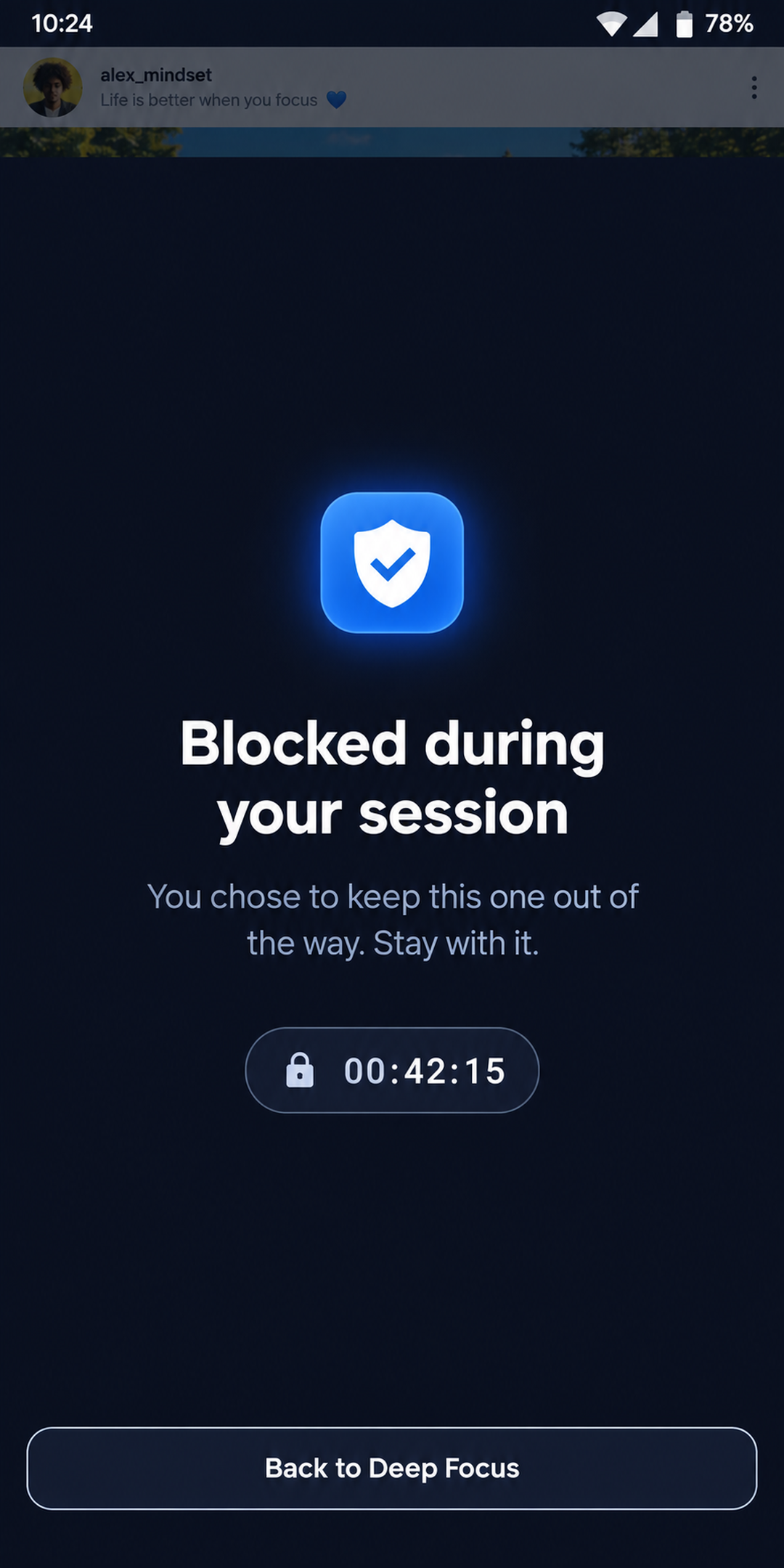
App blocking that holds for the whole session
Deep Focus raises a blocking screen over any app on your list the instant it comes to the front, and keeps it there until the session deadline. The mechanism is Android’s accessibility service rather than a foreground timer, which is what makes it survive the app being killed.
- Reacts to the app opening, so no frame of the feed is ever drawn
- Runs natively — force-quitting Deep Focus does not lift the block
- Takes itself down on its own when the deadline passes, even if the app never reopened
- Requires no draw-over-other-apps permission
- Your launcher, dialer, SMS app, keyboard and Settings can never be blocked
Your real phone
A picker of every app you actually have
One searchable list of every launchable app on the device, each with its own launcher icon. There is no curated shortlist of “usual suspects” and no category that quietly resolves to a bundle of packages — an app you have is an app you can name, and one row is one app.
- Real icons pulled from your device, not a generic glyph set
- Search by name, switch each app on or off in place
- An app you uninstalled keeps its row while it is still selected, so it can be switched off
- The free tier blocks 3; Pro lifts the cap entirely
The session
Any length, and no pause
Three presets — 25, 50, 90 minutes — plus a wheel that picks any length to the minute, up to twelve hours. A running session can be extended if you are in flow, and cannot be shortened, because a commitment you can trim down is not one.
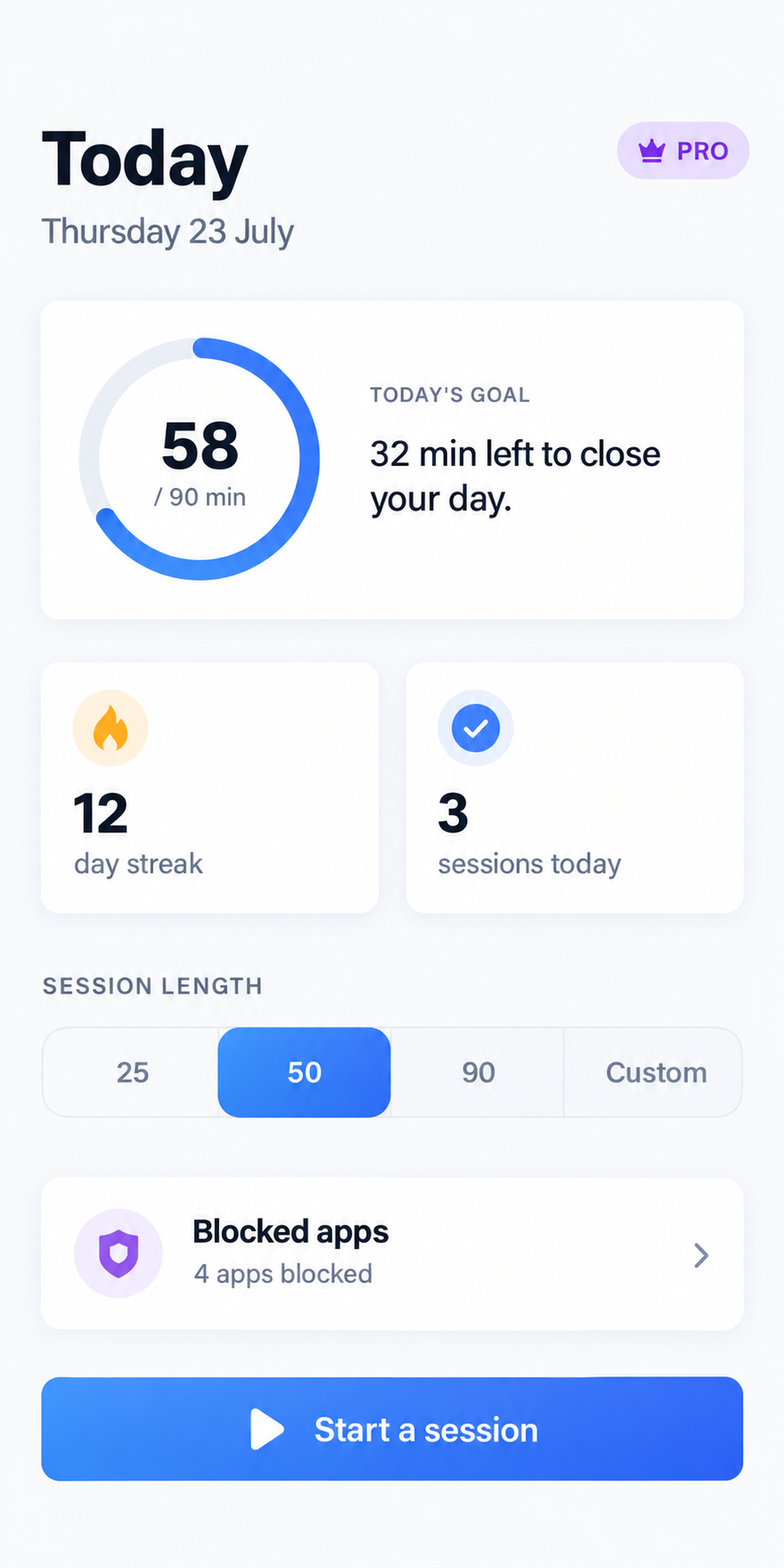
- An immersive dark countdown with the goal it is paying into and the streak it is playing for
- Wall-clock based: backgrounding the phone never drifts the timer
- A session survives the process being killed and picks itself back up
- Stopping goes through a confirmation that tells you exactly what it costs
- An end-of-session alert while you are away, and never while you are watching the ring
Android
Silence scoped to the apps you blocked
With notification access granted, Deep Focus postpones notifications from the blocked apps for the length of the session and delivers them the moment it ends. Your phone’s own interruption filter is never touched, and nothing else on your phone goes quiet.
- Notifications are postponed, never destroyed
- What is already sitting in the shade is swept when the session starts
- Ongoing notifications — a call in progress, navigation — are left alone
- Stop a session early and everything is handed back immediately
The loop
A daily goal you set, and a streak you cannot fake
Your goal drives the ring on the home screen, the goal-met rate in your stats and the bar on the widget. 90 minutes is where it starts; tap the ring to move it. The streak is derived from your day-by-day history rather than kept in a counter, so it cannot drift or miss a rollover at midnight.
- Minutes are credited to the day the session ends on, so a session past midnight pays into tomorrow
- Each day is judged against the goal you had that day, so changing it never rewrites the past
- An abandoned session keeps its real minutes but only counts as a session past four fifths of the target
Statistics
Week, month and year — measured honestly
A bar chart, your daily average, your goal-met rate and a streak strip. Averages are divided by the days you have actually been tracking rather than by the length of the window, so three weeks of history never reports itself as a year of failure.
- Week is free; month and year are Pro
- Before your first recorded minute the screen says so instead of drawing a wall of zeros
- Your personal best streak, and how far you are from matching it
Optional
Name a session, see where the hours went
Attach an activity — study, coding, writing, reading, or anything you type — and the Stats tab breaks your period down by activity. Time focused without naming it is reported beside the shares rather than diluted into them, so the numbers stay true.
- Eight starter examples, one tap each, so nobody meets the feature as an empty text field
- One field that searches your activities and creates a new one
- Archiving keeps an activity out of the picker while the sessions filed under it keep their name
- Nothing about it delays or gates starting a session
Pro · Android
A home-screen widget that is never stale
The live countdown while a session runs, your streak and today’s goal the rest of the time. It is read almost entirely while the app is closed, so nothing about it depends on Deep Focus being alive.
- The countdown ticks in the launcher’s process, accurate to the second with no updates
- It resolves the new day itself at midnight instead of showing yesterday until you open the app
- It credits a session that finished while the app was dead
- It survives reboots, app updates, and clock or timezone changes
- One tap starts a session
Coming back
Daily reminders, to the minute
A streak lives on coming back. Pick the moment Deep Focus should nudge you — as many times a day as you need on Pro, one on the free tier — and the app asks for notification permission in context rather than leaving a switch that silently fires nothing.
- Picked to the minute, not to the hour
- Scheduled locally — no push server involved
Everywhere
20 languages, light and dark, LTR and RTL
English, French, Spanish, German, Brazilian Portuguese, Simplified and Traditional Chinese, Japanese, Korean, Arabic, Hindi, Bengali, Russian, Indonesian, Turkish, Italian, Dutch, Swedish, Polish and Vietnamese. The blocking screen and the widget are translated too — they are the two surfaces you read when the app is not open.
- Right-to-left layout for Arabic, applied throughout
- Light, dark, or whatever your phone is set to
Privacy
No account, and no server behind it
Deep Focus does not have a backend. Everything it knows about you is in your phone’s storage, and uninstalling the app removes all of it. The free tier shows ads through Google AdMob behind Google’s consent form, and the app reports anonymous usage and crash data through Firebase — Pro removes the ads.
- No sign-up, no email, no profile
- The blocking service cannot retrieve window content
- Notification access only reads which app sent a notification
- Ad personalisation choices can be reopened from Settings where your region requires it
The shortest way to check any of this
Install it, block one app, start a 25-minute session, and try to open it.